Part I of II.
| Assignment | rebuild a live, feature-rich no-code app as a production Next.js 16 codebase |
| Span | 6 March – 10 August 2026 · 158 days |
| The “code” I started from | an 11.6 MB minified JSON — the Bubble app export |
| Shipped | 1,395 units of work on main · 1,029 merged pull requests · 250,000 lines of TypeScript: about 114,000 of production code and 116,000 of tests |
| Throughput | 6.8 → 11.2 units of work a day (+65%) after the move into the cloud |
| Cold load | multi-second → sub-second |
| Released | 48 versioned releases plus 18 hotfixes — a production deploy every 2.4 days |
| Cutovers | 3 workspaces, zero rollbacks |
| Team | four people, and ten to twenty-five Claude Code agents at a time |
Disclaimer: the disclosures in this case study were approved by Playgram management, i.e. no NDA breach.
After I started writing this case study, I realized that even the brief I’d give Claude to hydrate turned out to be 5,300 words long — and even then, after I’d finished it I understood that I’d only scratched the surface of everything I wanted to tell. So, (a) sorry it’s so long, (b) check out the mini versionmini version and the nano versionnano version, and (c) I’ll post more detailed insights on some or all of the aspects later.
Intro
In case you didn’t know, Bubble is a no-code app builder.
When you think of such tools, you’d think that people would just use it to make simple things — a directory site, an internal CRUD tool, a booking form, the kind of marketplace MVP you build to find out whether anyone wants it.
But you’d be surprised how far people can actually take it — from a subletting marketplace whose hosts have earned $16.2 million and which Stripe projects will process $60 million this year, to a hospitality operations platform running a hundred-plus organizations and up to 30,000 daily guest users.
None of those are toys. A lot of software you’ve used was probably drawn rather than typed.
In our case, we’re talking about Playgram, an app that managed to put together a chat interface giving access to multiple providers and models, realtime team/project chat UIs, libraries of generated images & files, memory & knowledge management, voice input, and tons of other small “nifties” — all brought to life with no code at all:
See video at vovazakharov.com/case-studies/assets/playgram-demo.mp4
(This is a screen recording already after migration to code, but you get the idea.)
So why would then they want to switch to code if it was all so great?
Why
1 — Performance. However hard you try, when you put abstraction over abstraction over abstraction to make an app work in a “draw a couple of interconnected boxes, and it just works” fashion, you’re bound to hurt the performance. The platform — quoting its own performance guide — sends “the code for all the elements (visible and invisible)” before it draws anything, degrades multiplicatively with every nested repeating group, and ships the code of every plugin you install on every page load, whether you use it or not.
Regardless of any performance improvements you try, a Bubble page ships three render-blocking platform bundles before your app even exists. A group of developers measured an almost-empty page — one text heading, nothing else — and found a Lighthouse Speed Index of 1.5–1.7 seconds.
To spoil the ending: moving Playgram to Next changed cold load times from multi-second to sub-second; something which is instantly tangible for a user, even if “wait a couple secs at first load” doesn’t sound like such a big thing.
2 — Bumping into the bubble’s edges. All too many Bubble developers have faced the same thing again and again as their apps grow: they meet the system’s limits and end up installing (and sometimes purchasing) third-party plugins, running vanilla JS in the browser, or even writing their own reactivity frameworks to make up for what Bubble can not provide. Quite illustratively, the number one Bubble plugin, with over 538,000 lifetime downloads, is one that allows running custom JavaScript. The most popular thing anyone ever built for the platform is a way out of it — and two of the five top templates that year were entire homegrown application frameworks built on top of Bubble, for the same reason one layer up.
In the case of Playgram, by the way, the makers are Zeroqode, an agency specializing specifically in Bubble, with a ballpark of 800 plugins shipped, two of which were among the five most-installed community plugins for Bubble in 2023. And they still felt like they were lacking.
3 — Missing out on all the AI agents stuff. Although Bubble has been making inroads into using AI for its builders, needless to say its capabilities are far behind what modern tools like Claude Code, Cursor, or Codex provide. The team was feeling like they were missing out on being able to deliver more features in smaller time frames.
That third one is most of what this case study is about. The customer didn’t just want code. They wanted the thing that code makes possible. Running ahead a bit, here are three examples from the far end of the project, all of them things the product had wanted for a long time:
- Billing that actually bills. In Bubble, a plan’s credit allowance was a number attached to a price — never shown, never counted against, never enforced. In the rebuilt app it’s a metered balance: every reply priced from the real provider cost, decremented live, and enforced server-side at send time, so a workspace that runs out gets refused rather than billed. Fifteen days from the first commit to that running in production.
- Access control. Member groups with a per-group allow or deny list over the model catalogue and a per-member override on top, enforced server-side and greyed out in the model picker rather than hidden from it. About two weeks.
- A carbon estimate. This one came from one of our university customers, who wanted to know what a chat turn costs in emissions. What shipped is a per-query CO₂e figure — token counts against a versioned per-model energy coefficient. Eleven days from the start to production.
Now, keep in mind, the people who’d be living in this codebase weren’t some future team of hired engineers — they were the same people who had drawn the app in the first place. Making them faster was the actual assignment. Whether that worked is a question this piece can answer, and I’ll come back to it at the end.
What
With all the why’s settled, here’s what Levon and his team came up to me with. They wanted a fully functional code-based rewrite of an already working app shipped in 1.5–2 months (a timeline I agreed to but didn’t ultimately meet).
To give some perspective on why this was a pretty challenging endeavor:
1 — A Bubble app export — the “code” in “no code,” and the thing you’re going to feed to an agent while rebuilding — is a multi-megabyte JSON. In the case of Playgram, it weighed 11.6 megabytes, minified, on one line. Suffice to say, VS Code crashes when you try to open a JSON that big. Good luck feeding that to an agent.
2 — This was a live app in the beginning of its lifecycle. The team was meant to keep shipping new features, improving prompts, and catching bugs while a code rewrite was being built in parallel. The target kept moving, on purpose: you don’t freeze a product for four months to please your contractor.
3 — The team invested quite a lot into design, so they were adamant the rewrite had to be not just functionally equivalent, but a pixel-perfect match visually, too.
4 — Like most Bubble apps, the app kept its data in Bubble’s proprietary DB format, with no way of easy data migration to a new platform, whatever that would ultimately be.
Below you’ll find how we tackled each of these challenges; how we discovered new ones I would’ve never envisioned, and what mistakes we made along the way (so you don’t have to).
The rebuild, in numbers
Before the grit, the shape of the thing.
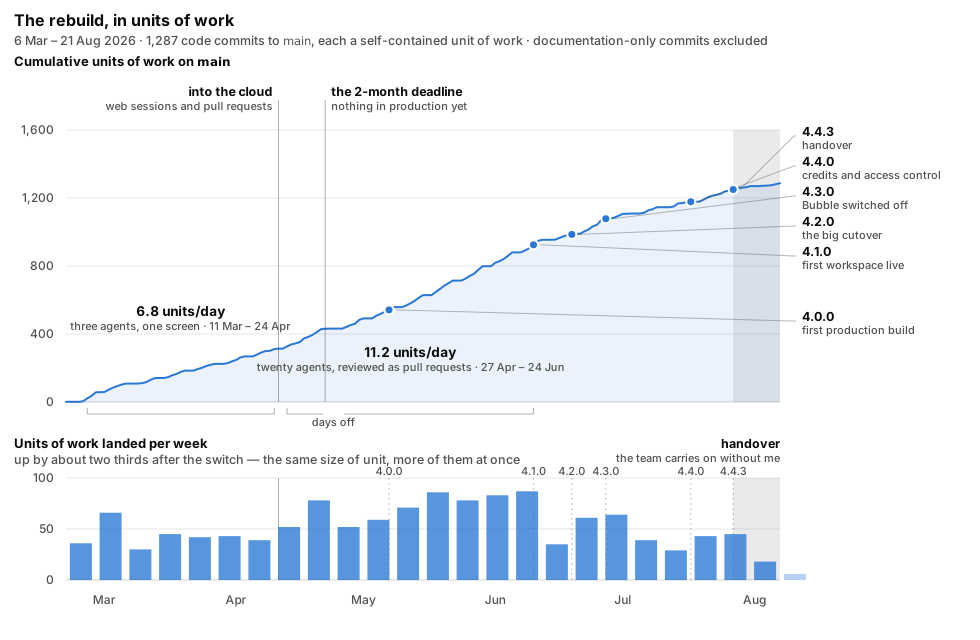
| Date | Day | What happened |
|---|---|---|
| 6 Mar | 1 | First commit. Not code — a splitting script and a pile of research. |
| 10 Mar | 5 | The Next.js app gets bootstrapped. layout.tsx, page.tsx, and nothing else. |
| 12 Mar | 7 | First feature code: auth screens, styled to match the Bubble original. |
| 19 Mar | 14 | A message goes to an LLM and a response comes back. The product loop works. |
| 25 Apr | 51 | Development moves into the cloud. The first web sessions, on their own branches. |
| 6 May | 62 | The original deadline. Nothing in production. |
| 21 May | 77 | 4.0.0 — first production build. |
| 24 Jun | 111 | 4.1.0 — first workspace actually running on the rewrite. |
| 3 Jul | 120 | 4.2.0 — the big cutover. |
| 11 Jul | 128 | 4.3.0 — all workspaces on the rewrite. Bubble is off. |
| 31 Jul | 148 | 4.4.0 — workspace credits and model access control. |
| 10 Aug | 158 | 4.4.3 — the last release that’s mostly mine. Handover. |
Let’s have a look at the dynamics for a bit. As you can see, the output steps up from 6.8 to 11.2 units of work a day — by 65%! — within days of the switch to web sessions in late April (more on that below). It then runs at its ceiling — four straight weeks in the eighties — right up to 4.1.0 on 24 June, and that stretch is a visible race: bug fixes are 39% of everything landing in it. The week after 4.1.0 it halves and never returns to the ceiling, which is where rebuilding Bubble-as-it-was stopped being the job: refactors go from 11% to 17% of the work, release management becomes a line item, and what’s left is new features, bug fixes and chores at a pace a normal team would recognise.
A word on what a “commit” means here, because it’s load-bearing for that chart. Before switching to a PR-based approach (more on that below), every commit to main was a finished set of work on a specific, well-defined scope. So, basically, you can say it was a PR, just not formed as such. After the switch, every commit on main is a squash from a PR branch — so, throughout this codebase’s evolution, the “conceptual” meaning of a commit on main hasn’t changed.
Part one: setting the table
Everything in this half happened before the code could scale. It’s the least glamorous four weeks of the project and the reason the other fourteen worked.
The split
As I already said, the JSON that is an exported Bubble app is an 11.6 MB file, minified, so not even the most context-rich agent would be able to eat it at once. That’s why the first step I took was to write a script that splits it into pieces.
But “splitting” isn’t as straightforward as it seems.
1 — You can’t just grab subobjects from the huge JSON, cut them by some ceiling size, and expect an agent to handle it. For context, our ultimate split turned out to be 3,487 files — far more than what an agent can comfortably navigate. Slicing by size gets you 3,487 files named after nothing, and an agent that must grep through them to find something it needs, every time.
2 — Even if you DO manage to split it once — remember, the app changes; so every week, once you re-export the Bubble app and try to have the agent “look at the diff,” you’d get a chaotic mess that would be impossible to make sense of.
So what did we do? We had an agent research the common data structures within the JSON programmatically, figuring out what a usual “workflow” is, how its constituent “actions” look, which keys store the “names” of all those entities, etc. As a result, we were able to split it into something that almost looks like code (or, at least, enough so for an AI agent — not a human, mind you — to be able to figure it out).
For example, here’s the click handler on the chat composer’s send button. The splitter gave it a directory of its own and wrote one file per step, so actions/index.js is the workflow’s body, in order, as ES module imports:
// bubble/playgram_split/pages/index/workflows/buttonclicked_btnaw0/actions/index.js
import { _1488796042609x768734193128308700_aag } from './_1488796042609x768734193128308700_aag.js';
import { setfocustoelement } from './setfocustoelement.js';
import { setcustomstate } from './setcustomstate.js';
import { resetgroup } from './resetgroup.js';
import { schedule_trigger_stream_existing_chat_after_0_seconds } from './schedule_trigger_stream_existing_chat_after_0_seconds/index.js';
import { displaylistdata } from './displaylistdata.js';
import { setcustomstate_1 } from './setcustomstate_1.js';
import { schedulecustom } from './schedulecustom.js';

export const actions = {
  0: _1488796042609x768734193128308700_aag,
  1: setfocustoelement,
  2: setcustomstate,
  3: resetgroup,
  4: schedule_trigger_stream_existing_chat_after_0_seconds,
  5: displaylistdata,
  6: setcustomstate_1,
  7: schedulecustom,
};
Read that as a function body and you’re reading it correctly. The directory name carries the trigger, the numbered map is Bubble’s own step order, every step is a file you can open — and step 4’s filename is the label a human typed into the Bubble editor rather than a slug of an ID, recovered from the export’s name field: “Schedule trigger_stream_existing_chat after 0 seconds.”
One lovely detail: Step 0, the only step with an unreadable name, refers to using Toolbox, the run-custom-JavaScript plugin from a few paragraphs up. Step zero of sending a chat message in our no-code app was a Run javascript action.
Elements got the same treatment. A whole reusable component, 27 lines, untrimmed — its own properties, then the two imports that bind it to its children and to its handlers:
// bubble/playgram_split/element_definitions/dropdown_admin_analytics/index.js
import { elements } from './elements/index.js';
import { workflows } from './workflows/index.js';

export const Dropdown_admin_analytics = {
  elements: elements,
  workflows: workflows,
  properties: {
    height: 200,
    width: 200,
    group_type: 'option.date_period__os_',
    background_style: 'none',
    max_width_px: 80,
    default_width: 200,
    max_height_px: 36,
    min_height_px: 36,
    wf_folder_list: { bTqIt0: 'Project', bTqIu0: 'User Settings' },
    element_version: 5,
    container_layout: 'column',
    custom_element_platform: 'web',
  },
  type: 'CustomDefinition',
  id: 'bTrBV1',
  name: 'Dropdown admin analytics',
};
The directory tree does the rest of the work, because it reproduces the UI containment hierarchy verbatim. workspace_settings/elements/popup_delete_member/elements/group_buttons/ is, quite literally, where the Cancel and Delete buttons live. memory_knowledge/.../group_container_voice_recorder/elements/button_save_recording.js is the save button on the voice recorder. An agent asked to find the delete-member confirmation does not search; it navigates.
As for the regular re-exports — the part where the Bubble app keeps being developed while we’re rebuilding it — keeping the diffs readable came down to a handful of deliberate choices such as naming files after their contents rather than their position, so inserting a step doesn’t rename its neighbours, and hoisting long strings out into sibling text files — a text embedded in JSON is a single line of escaped newlines that diffs as one enormous changed line, whereas a text file diffs like prose.
Once everything was done, every button, input group, workflow and the rest was tied to a specific file in the split — so when the Bubble app changed, the change showed up as a diff in the relevant files.
There was a lot of trial and error along the way, but overall I would say it was one of the most successful parts of the project, and something that definitely is a know-how to keep for further projects.
Verdict: 10/10 would use again.
Now that an agent had the app’s intricacies more or less figured out, it was time to start... coding? No, doc’ing!
The decision docs
The first four days of the assignment produced about 23,000 lines of documentation and zero lines of application code. The Next.js app didn’t exist until day 5; the first feature code — those auth screens — landed on day 7. And the decision work kept running for the rest of the fortnight alongside the first real code.
What were we deciding? Things like:
- Which hosting to use
- Which DB platform
- Whether row-level security was a safety net or a maintenance tax
- Which UI component library
Code-wise, the project was greenfield — although the app itself wasn’t — so every road was open. (The only one that wasn’t was basing it all on Next.js: that was the premise from the very first commit, on the reasoning that it’s the stack most likely to leave you with a maintainable codebase whoever comes onto the project later, human or agent.)
Even stuff like which Node version to use, or which package manager, was subjected to scrutiny, and the decision process was insanely intricate: four different models from different providers each made its own research, then a fifth synthesized their inputs and provided it for us humans to decide on.
As an example, here’s what the decision flow produced for the database question. (Note that the doc doesn’t mention model names — intentional to avoid the “judging” being biased for/against any or some of them.)
# Database Decision Documents: Comparison

_Four independently generated analyses of the same question: what should the
primary relational stack be for Playgram's Next.js rebuild?_

## Recommendations at a Glance

| Doc   | Recommended Stack                  | DB Host                    | ORM     | Auth          |
| ----- | ---------------------------------- | -------------------------- | ------- | ------------- |
| **1** | Drizzle + Neon + Better Auth       | Neon                       | Drizzle | Better Auth   |
| **2** | Drizzle + Railway PG + Better Auth | Railway                    | Drizzle | Better Auth   |
| **3** | Supabase + Drizzle                 | Supabase                   | Drizzle | Supabase Auth |
| **4** | Drizzle + Postgres + Better Auth   | Flexible (Railway default) | Drizzle | Better Auth   |

**Universal agreement:** Drizzle ORM. All four docs independently chose it over
Prisma and the Supabase client.

**Split decisions:** DB hosting (Neon vs Railway vs Supabase) and auth
(Better Auth vs Supabase Auth).

## Where They Disagree

| Question                                 | Doc 1                        | Doc 2                                      | Doc 3                                             | Doc 4                                 |
| ---------------------------------------- | ---------------------------- | ------------------------------------------ | ------------------------------------------------- | ------------------------------------- |
| **Is RLS valuable here?**                | No — BFF makes it redundant  | No — second auth layer, maintenance burden | Yes — strong multi-tenant DB guardrail            | No — app-side authorization preferred |
| **Is Supabase Auth worth the coupling?** | No                           | No                                         | Yes — mature, low-risk, handles OAuth/email flows | No                                    |
| **Is Neon worth an extra vendor?**       | Yes — branching justifies it | Not yet — revisit later                    | No — Supabase covers DB hosting                   | Defer — pick host after stack         |
If you look at the Doc 3 column, you’ll see that it was the lone dissenter — one against three — on both “is RLS valuable” and “is Supabase Auth worth the coupling.”
Doc 3 won both. We ship Supabase Auth and we ship RLS as a fail-closed safety net. The decision doc says out loud why the arithmetic lost:
Supabase was chosen despite a lower weighted score. Neon led the scoring on raw capability […] The matrix simply had no row for the factor that decided it, auth co-location.
This is an example of why I think the whole thing was to a considerable degree overthinking and — I hate to admit that — avoiding (future) responsibility (“but five agents told it would be fine!” sounds like a good argument until it isn’t).
“But five agents told it would be fine!” sounds like a good argument until it isn’t.
A note aside, I think here lies the most important thing to keep in mind when coding with agents: whoever writes the code or a document, it’s you who gets kicked if things go wrong, and rightfully so.
Verdict: 6.5/10; next time I’d probably spend much less time on obvious things. (Obvious counter-argument: next time I will have the setup that worked the first time, so I would likely not need so much decision-making at all.)
For the record, here are the decisions we actually made:
| Thing | Choice |
|---|---|
| Hosting | Railway |
| Database | Supabase (Postgres) |
| ORM | Drizzle |
| Framework | Next.js 16 |
| Auth | Supabase Auth |
| Row-level security | fail-closed safety net |
| UI library | Mantine v8 |
| Architecture | Feature-Sliced Design + BFF |
| Package manager | pnpm |
| Linting | strict ESLint + Steiger, every rule error |
| Testing | Vitest + RTL + Playwright |
| i18n | no library; per-slice config/texts.ts |
The strutwork: FSD, linters, and other things to keep the agents focused
Now, if there’s one thing I’ve learned about coding with agents it’s that agents work best when there are strict guardrails in place. For their own good. See, especially when it comes to “where to put what” decisions, agents work by the “nearest neighbor” principle. If you awkwardly misplace a line of code, cross-importing a low-level abstraction from a high-level component module, the next agent working on your codebase is more likely to do the same again. And again. And again. Over time, the likelihood of your codebase getting properly screwed up converges to 1.
When you don’t care about code hygiene, the likelihood of your codebase getting screwed up in the long run converges to 1.
Which is why, from the moment the first line of code was placed, I made sure to introduce SUPER-STRICT project structuring and linting requirements, and they only grew stricter as the work progressed.
The control freak work here consisted of three angles.
1 — Feature-sliced design
In case you don’t know the term, feature-sliced design, or FSD, is an approach to (mostly) frontend development that prescribes splitting your code into layers and slices, with rigid rules on what can be placed where, and what and how can import from what and where.
As an example, here’s the real import graph of the final state — every arrow is a count of actual import statements, and every arrow points down:


13 page slices, 14 features, 8 widgets, 8 entities — chat, subscription, llm-model, tenancy, file, member-group, project, keyboard-shortcut. 8,123 import statements inside src/. Number of imports that point upward: zero. Number of imports that reach sideways between slices of the same layer: also zero — because two tools won’t let us. Steiger runs as pnpm lint:fsd and is the authority; eslint-plugin-boundaries re-implements the same rules in the editor so you find out while you’re typing rather than at the gate.
Even without looking into the code of each of them, such a structure gives not just an agent, but every human who first looks at the directory structure, an approximate understanding of what’s going on. This has helped immensely especially when new features came into view: the agent doesn’t need to spend its time, mental resource — and tokens — thinking about where to place that member-group access control feature we discussed in the standup and that has now to be implemented. It sees clear, logical patterns, and follows them.
There’s a second-order effect worth pointing out. Between the first production build and the handover, src/ went from 98,000 to 223,000 lines, tests included — and the layers that grew fastest in relative terms are the bottom ones. shared and entities both nearly tripled; the app-specific top layer didn’t quite double. Rigid boundaries make the reusable layer the path of least resistance, so it thickens on its own.
An unobvious beauty of it, which you only discover through struggle, is that when you have something that does NOT seem to fit, it almost always ends up meaning you’ve got some higher-level conceptual understanding wrong. The form ends up defining the essence — for everyone’s better.
When a piece of code refuses to sit anywhere in your structure, the form ends up defining the essence — for everyone’s better.
Verdict: 8.5/10 only because I think I could be MORE rigorous with FSD hygiene, things like type definitions placed in /api segment rather than /model where they belong.
2 — Linting
Now, I’m a simple man: I see a lint rule, I turn it on.
No, seriously. We have 362 lint rules explicitly enabled in the project: 111 from core ESLint, 102 from @typescript-eslint, 38 from jsx-a11y, 35 from @eslint-react, 21 from @next/next, and a scattering from unicorn, boundaries, drizzle, simple-import-sort and friends. We also have 28 hand-written ones on top. AND, where linting itself isn’t enough, we’ve written standalone scripts that make it even harder for an agent to go astray.
To add to this, nothing is ever silently inherited: every rule is listed explicitly as error or off. It’s a longer config, but it means no rule ever changes behaviour because a dependency bumped its recommended set. No rule is ever set to warn: a warning is a rule nobody enforces — LLMs and humans alike treat warnings as negotiable and let them accumulate.
Here are some examples of the hand-written ones:
prefer-shorthand-spread requires { ...{ wug } } instead of wug={wug} on components, and folds runs of them together, so a={a} b={b} c={c} becomes {...{ a, b, c }}.
prefer-matches prohibits using bare eq(table.field, field) in favour of the hand-written matches(table, { field }) helper, to avoid noise such as and(eq(chats.workspaceId, workspaceId), eq(chats.projectId, projectId)) — which matches(chats, { workspaceId, projectId }) says in a third of the width. (It also supports things like { archivedAt: null }, which becomes isNull(chats.archivedAt) under the hood.)
safe-action-required is the most consequential of the 28, because its failure mode is a live authentication hole. Next turns every function exported from a 'use server' file into an endpoint the browser can call — no route file, no ceremony, just an export. So the rule requires every one of them to be wrapped in safeAction(...), a helper we wrote that establishes who is asking before the body runs and wraps any errors in a result object the frontend can read.
Individually, they don’t seem like a big deal. Together though, they make the entire codebase look DRY, clean and less token-wasteful for agents who keep reading them hundreds of times a day — and, as the one above shows, several of them are stopping real bugs rather than untidy formatting. The case for writing your own is that an agent will cheerfully ignore a paragraph in your CLAUDE.md and will never, ever ship a lint error.
To top it all, the fearful type-overlap script. It parses every type alias in the codebase and reports any two of them that declare the same member — same name, same modifiers, same annotation. One shared member is enough to fail the build. If Chat and ChatSummary both declare workspaceId: string, that’s a failure, and the fix is to extract a shared base and have both include it.
Why bother? Because a duplicated shape is two things to change, and TypeScript will never tell you they’ve diverged — each copy redeclared its own fields, so both compile perfectly while meaning different things. For example: we had a tokenCounts: { input, output } shape sitting next to a pair of DB columns called inputTokens and outputTokens. Both type-checked. Every usage log we wrote recorded zero tokens. We found it by accident, months later, during an unrelated refactor.
There’s a second return: about a third of the time, a reported overlap turns out to be a key that’s lying rather than a missing base. Two types both had a file, and one meant a path while the other meant a File. Two had an owner, meaning a repo owner and a workspace owner. One pair had isActive and active for the same concept. As the decision doc puts it: the tool can’t tell you which; it makes you look.
Turning it on at full strength would have failed the build in hundreds of places at once, so we tightened it a notch at a time. At first the script only complained when two types shared three or more fields; then two; then finally one. Over 26 days, there were thirteen landings on main, about 1,300 file-changes, every one of them type-level only. 248 overlapping groups were cleared in total, and roughly 330 shared bases exist now that didn’t before.
Overengineering, you think? But think about this: the alternative is 248 pairs of types disagreeing with each other in a codebase where a dozen agents edit in parallel and none can see the other copy. The tokenCounts bug cost us months of wrong analytics and was found by luck. In a codebase with 3,000 declared types, it’s not something you should take lightly.
Verdict: 10/10 — they just work, make the code cleaner, and, unlike humans, agents don’t get rage bouts from them.
Tip: put something along these lines in your CLAUDE.md to stop agents from trying to circumvent lint rules:
Do not contort the architecture solely to silence a rule. Rules exist to keep the codebase consistent and safe — work with them, not around them in a hacky way.
3 — Scripts, where linting can’t reach
A lint rule sees one file. Some things you want to forbid are properties of the whole graph, so they end up as scripts in the vet suite. A few, to give the flavour of what this category is for:
poison-check— catchesserver-onlypoisoning: any'use client'file that transitively imports a server-only module. It reads madge’s dependency graph and re-parses with TypeScript, specifically so type-only imports don’t count, since those are erased at compile time and are harmless.drizzle-chain-check— verifies that the migration snapshots form an unbroken chain. This one was written after migration0099was generated on a branch that hadn’t merged0098, which forked the chain and dropped an enum value, with nothing failing at deploy time for two whole migrations. Parallel agents plus sequentially-numbered migrations is a footgun you don’t hear go off.ast-metrics— reports the biggest files in the codebase so you can see when one is turning unwieldy, and deliberately never fails. It sizes them by counting syntax nodes rather than lines, because some of our largest files are LLM prompts, which run to hundreds of lines as they should while being, structurally, a single string.
All of them run concurrently, all of them run to completion even when one has already failed, and the summary at the end names every check that broke. That last property matters more than it sounds when the consumer is an agent: fail fast and it fixes one thing, pushes, and waits four minutes to be told about the next.
Planning
Now that we had the functionality figured out (or so we thought), and all the strutwork in place to keep the code from falling under its own weight once it was there, it was time to figure out where to actually start.
Our initial approach was: if we know the entire functionality, why not just describe everything we have to do in a single document? That’s how the “migration plan” was born, and it looked very detailed — file-by-file, path-by-path, with stage numbers and acceptance criteria.
Here’s a piece of it as of early April, a month in — the plan’s own inventory of the entity slices, labeled “current state”:
├── entities/                         # FSD Entities layer
│   ├── auth/                         # getUser, env config, Zod schemas
│   ├── chat/                         # Chat queries, scope filters, Weaviate message ops
│   ├── file/                         # File CRUD queries, CDN cleanup, provider cleanup
│   ├── keyboard-shortcut/            # Shortcut type registry, provider, hooks
│   ├── llm-model/                    # Static model catalog, provider groups, cost calculation
│   ├── message/                      # Message display components (markdown, code blocks)
│   └── tenancy/                      # Workspace/member queries, mutations, workspace cookie
Seven slices, described as the state of the code on the day. On that same commit the codebase actually had six: there was never an entities/message — not then, not once, in the entire history of the repo. auth was real, and was gone by the first production build in May, absorbed into shared/supabase. And of the eight slices the codebase finally settled on — chat, subscription, llm-model, tenancy, file, member-group, project, keyboard-shortcut — three aren’t on that list at all, the last of them, member-group, not arriving until late July. And this is the tidy layer; the stage-by-stage file lists drifted faster and further.
As the work progressed (we’ll get to that later in more detail), this detailedness started being more of a burden than a help. There are few annoying things more important, and few important things more annoying, than keeping codebase documentation from drifting — and this file was a prime illustration of it. Every one of those file paths was a promise, and the codebase kept breaking them for perfectly good reasons. After a while you’re not reading the plan to find out what to do; you’re reading it to find out how out of date it is.
Verdict: 6/10 — next time I’d keep only the big picture in the plan, leaving the details to figure out as we go.
Part two: learning to run twenty agents
Everything up to here I could have done in 2024, slowly. This half is the part that actually changed how I work.
Before I started working on the project, I used to work with 3, tops 5 parallel agents at once, all on my local machine, all with carefully looking into every line change as they made it, and even into their “thinking” (talk about micromanagement). The way this assignment turned me from this to comfortably handling 10–15 parallel sessions, all in Claude, with focused code reviews instead of “looking from behind the shoulder,” represents probably the biggest evolution of me as an AI-enabled software engineer.
So what drove it, and how exactly did it translate?
Cloud-based agent VMs
Like many, I initially started using Claude via its VS Code plugin; after a while, like many again, I switched to the CLI because it seemed to roll out new features and fixes faster. However, both suffered from the same thing: I had to have my laptop on, and, when it was more than 3–5 agents, it just started melting under the load.
So my initial switch to the web interface was one born out of necessity, and very reluctantly.
Thing is, my first-ever introduction to coding agents was via the first version of Codex, which ran on web, and the UX felt counterintuitive and cumbersome. I imagined it would be the same.
It also felt too “hands-off” that the agent would be working somewhere that isn’t right here, you know?
Finally, constantly having to merge conflicting branches into main seemed like it would have been quite a headache.
But boy could I be wronger.
It felt too “hands-off” that the agent would be working somewhere that isn’t right here. But boy could I be wronger.
Mere weeks after starting, I was already running 20+ agents at once, limited only by the account’s five-hourly quota:
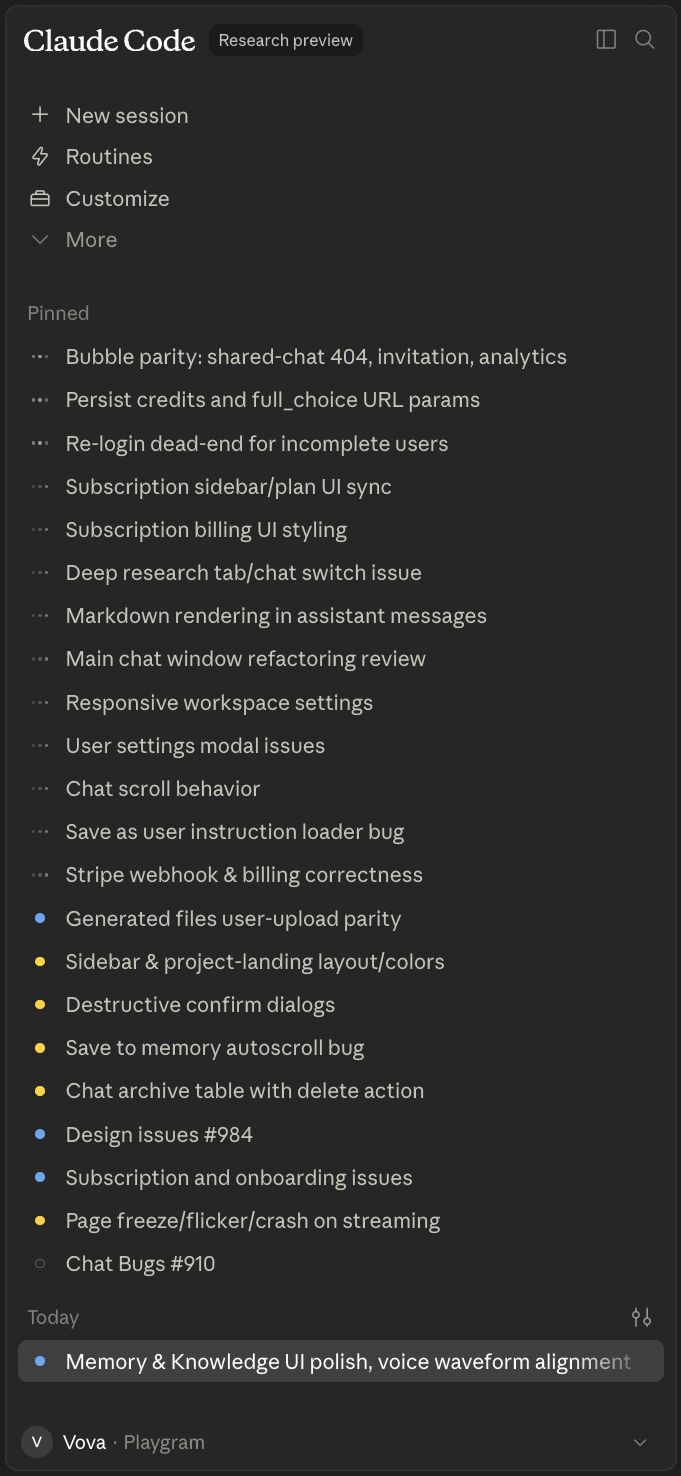
So how did my fears resolve?
1 — UI/UX has largely improved.
Depending on your choice of agent software (Claude Code / Cursor / Codex / etc.), these will vary, but I can judge by the first two, and both are really convenient to use.
- Each starts a new branch in the cloud, which can be turned into a PR with a click of a button (although I did end up replacing that with my own
/prskill — more on that below) - Whenever there is a PR, you can conveniently navigate to it to review files, post your comments, and hand them over to the agent afterwards
- You can pin the sessions you’re working on right now, and the sidebar shows each with its current state — in progress vs completed — so switching between them becomes a matter of clicking any one that’s currently idle
A callout on the choice of software, models, etc.: the thing all those benchmarks don’t usually tell you is that it doesn’t make much difference! Each model and each app has its quirks — but at this point, all are really good. It’s like choosing between a Makita and a Bosch hammer drill to do home repairs: there are people who will endlessly argue which one is better, but in the end either one puts the shelf up.
2 — “Hands-off” engineering actually turned out much more comfortable than I thought.
Like many coders, I liked to be “close to code.” I thought, I know the tricks of the trade better than an AI would do, I had opinions on how certain things should look, etc. Well, guess what, I still do, in a way (for 95% of cases, agents do know better than me, but the remaining 5% is where you actually understand why you still need a knowledgeable human in the loop).
But here’s the thing: you don’t have to be constantly in it to be able to steer it. Right now my flow is almost 100% based on code reviews I do in GitHub’s native interface, based on already made changes. (And, of course, before that there is also most often the planning stage, which I also review rigorously.)
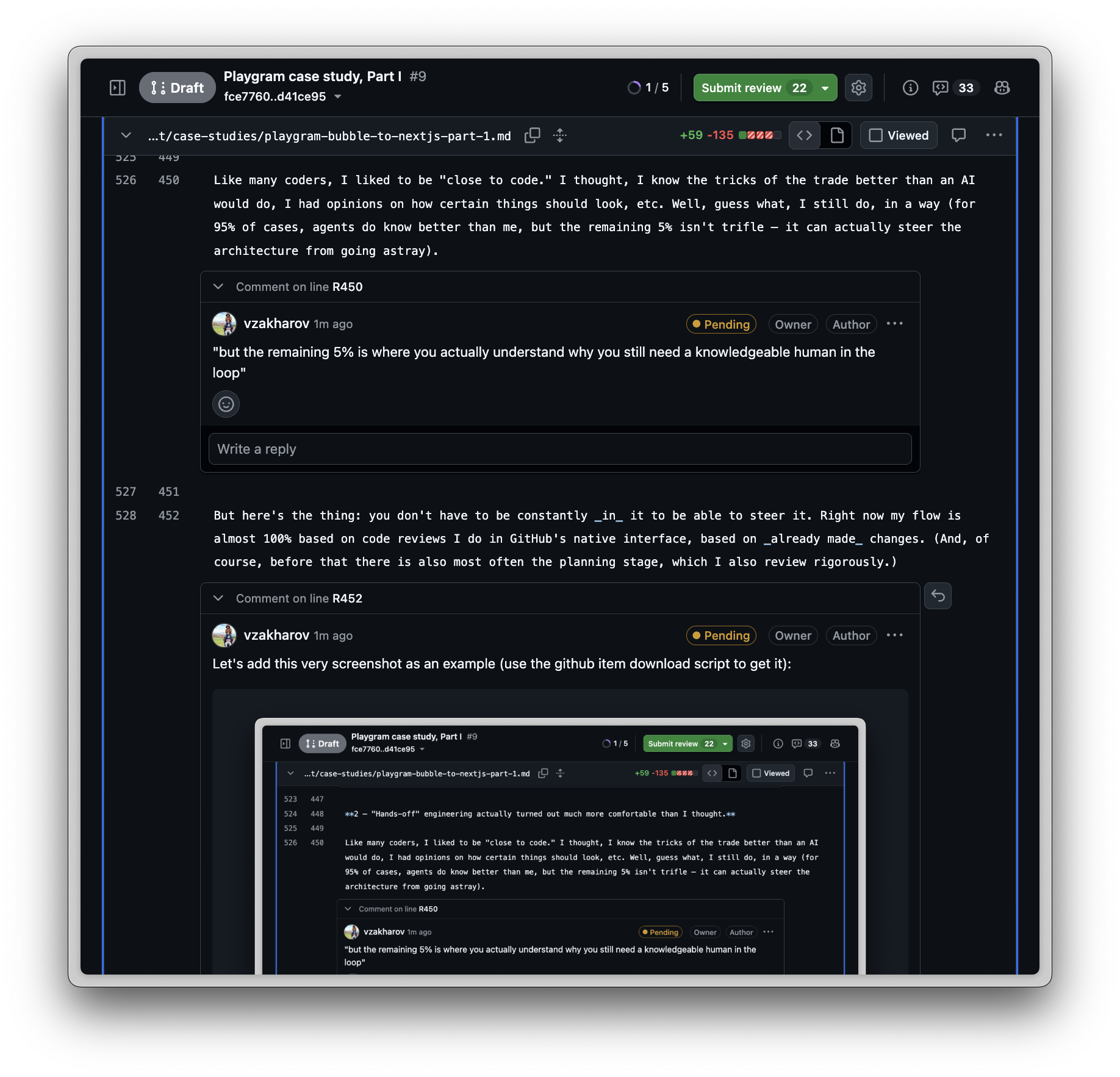
(Right, the process we came up with can be applied to far more than code — that screenshot is me reviewing this very article the same way I’d review a migration PR, comment by comment. I run all my personal stuff in a separate repo with almost the same set of skills now, that’s how versatile it is. And yes, you can read what was actually used as an input to create this case study: https://github.com/vzakharov/vovazakharov.com/issues/4 — I’ve nothing to hide.)
In a way, I turned from a boss who’s constantly micromanaging his team into one who reviews the outcome, not the process.
I turned from a boss who’s constantly micromanaging his team into one who reviews the outcome, not the process.
3 — Handling merge conflicts turned out to be the most overestimated complexity.
Apart from handling database migrations, which do have the tendency to go south if worked on simultaneously in different branches (and I’ll get back to this later), agents turned out to be perfectly capable of resolving merge conflicts in a large variety of situations. I’m not only talking about leading the branch to technically not having conflicting files with main, but about actually having a thought about what changed here, what changed there, and how the changes interact with each other. Yes, it took writing a skill to make sure the usual footguns are taken care of — but, after more than a thousand merged PRs resolved this way, I’ve had zero problems with agents doing this.
And what did it actually buy? The chart at the top has it bracketed: 6.8 units of work a day on main in the six weeks before the switch, 11.2 in the eight weeks after, at the same median size of about 380 changed lines either side. 65% more shipped work, out of the same one person — reviewing instead of typing.
Verdict: 10/10 — you can’t get back to the CLI or the VS Code plugin once you’ve mastered the zen of the cloud.
Building the skills
Now, this is perhaps the tastiest part for anyone dabbling with coding agents. Over the work, I came up with a variety of skills that make sure every repeatable process behaves in an expectable way.
Let me give you the most useful of them.
| Skill | What it does | How it helps |
|---|---|---|
/audit-github-backlog | Sweeps every open issue and PR against today’s code and proposes a close/refile/keep plan. | Fans analysts out per backlog bucket Assigns P0–P3 to every keeper Asserts coverage mechanically, closes nothing |
/autopilot | Unattended grooming loop: claims one contained issue, plans it in a comment, implements, hands off. | Claims work with a visible label Imitates plan mode as an issue comment Leaves only the merge for humans |
/dry | Reviews the session diff for duplication, applying the obvious consolidations and escalating the rest. | Applies obvious dedups silently Surfaces only ambiguous abstractions Keeps non-issues out of the report |
/finalize | Land prep: vet, merge the base, dispatch tests if warranted, mark ready, propose the squash, attest. | Runs vet and merges the base branch Sweeps working artifacts off the branch Posts the only durable verification record |
/from-branch | Attaches the session to an existing branch or PR, abandons the auto-branch, then runs the follow-up. | Resolves PR deep links and bare branches Deletes the throwaway session branch Dispatches the requested follow-up skill |
/hotfix | Ships a fix straight off production, bypassing staging, with a retargeted PR and post-merge reconcile. | Gates urgent work behind a plan anyway Retargets the PR onto production safely Reconciles the shipped fix back to main |
/implement | Executes an approved plan end to end, runs the mandatory quality passes, then opens a draft PR. | Flips the plan file to in-progress Forces the dry and tighten-docs passes Ends with a draft PR opened |
/issue | Takes a GitHub issue end to end: exports the thread, splits when oversized, implements, opens a PR. | Reads the exported thread and attachments Splits over-scoped issues before coding Lands every slice as a draft PR |
/log-review | Reads production logs since the last run, forms an opinionated readout, files a deduped issue per problem. | Reduces the firehose outside the context Dedups issues by judgment, not strings Publishes a readout plus Slack summary |
/plan | File-based stand-in for plan mode and multiple-choice questions in web sessions where those UIs misbehave. | Writes a reviewable plan under docs/plans/ Asks questions as numbered prose Emits a copyable /implement handoff block |
/pr | Opens the draft PR: renames the branch, pushes, derives title and body, adds QA checklist and squash proposal. | Blocks until the plan gate clears Renames the branch before a PR exists Posts the squash proposal up front |
/preview | Mounts a change on a temp route in an env-less VM and screenshots it at several widths. | Boots dev against a placeholder env Replaces reasoning about looks with looking Decides teardown versus commit beforehand |
/propose-issue | Finds the existing open issue that already covers a proposed unit of work, or files a new one. | Searches before creating a duplicate Turns surfaced follow-ups into tracked issues Serves as other skills’ filing entry point |
/readonly-probe | Dispatches a structurally read-only DB, vector-store and platform-log probe against staging or production. | Grounds investigations in real deployed data Wraps every query in read-only transactions Reaches infra an env-less VM cannot |
/release | Drafts the release commit and notes, and opens the staging-based PR that arms the production deploy. | Proposes the SemVer bump from commits Writes the release-notes file for review Fast-paths urgent fixes as micropatches |
/squash-message | Owns the copy-ready squash title and body: drafts it in a file, tightens it, posts it as a PR comment. | Drafts into a file before showing anything Enforces a tightening pass first Edits the live comment on re-runs |
/sync-branch | Brings a branch up to date with its merge target in a single reviewable merge commit, then pushes. | Resolves the merge logically, not just textually Keeps the catch-up to one commit Delegates target detection to check-merge |
/test-on-gh | Dispatches GitHub-hosted test runs (default, integration, E2E or targeted) and blocks for the result. | Buys CI signal where PRs run none Selects buckets, specs or flake passes Forces a push before dispatching |
/tighten-docs | Rewrites added prose that narrates the change or spends more words than it informs, in place. | Converts change-narration into lasting contracts Cuts prose the signature already states Leaves declared no-touch zones alone |
/update-docs | Diffs since the last doc-update commit and refreshes the decisions summary and other affected docs. | Confirms findings before editing docs Advances the update watermark Commits the documentation refresh |
/update-tests | Analyses recent changes for unit, integration and E2E test gaps and files an issue per gap. | Names gaps by test category Files each gap through propose-issue Writes no test code itself |
/watch-ci | Watches an in-flight Actions run tick by tick, pushing fixes mid-run behind the commit skip marker. | Surfaces failures as they happen Pushes fixes without wasting the run Hands non-actionable failures to fix-ci |
The thing worth pointing out about that table is that they compose. /implement doesn’t just implement; it loads /dry and /tighten-docs by reference and then hands off to /pr, which loads three more. /finalize reaches into six others. The skills work as a call graph, and the reason that works is that each one is a file in the repo that another one can point at.
Verdict: 8/10 — some skills got churned along the way, some might as well be in the future. I guess that’s the nature of the process, but having to keep an eye on updating them — and mostly forgetting to — is a burden. Thirty-three files that describe how you work is a real asset. It’s also a second codebase, and it drifts exactly like the first one, except nothing lints it.
If any of this looks worth stealing: the whole set, minus everything Playgram-specific, now lives in
agent-project-boilerplate— the repo I start every new project from, this website included. It’s the shortest path to the parts of the above that travel.
Planning and implementing
/plan and /implement, among the skills above, are perhaps worth talking about at some length.
Obviously, everyone knows all the agent software already has “plan mode,” so why create a skill that does the same?
Well, believe it or not, it initially started as a way to work around a bug in Claude Code. In web sessions, the plan-approval dialog doesn’t survive the session going idle: the backend wakes the session back up and re-emits the pending prompt, so you end up staring at the same plan-approval box stacked three or four times, and if you answer one of the superseded copies your answer goes nowhere. Same for the tool that asks you multiple-choice questions. Annoying in a way that’s hard to work around from the inside, since the thing that’s broken is the thing you’d use to ask about it.
So I thought, okay, I’ll just create a skill that would do exactly the same as what plan mode does (by mentioning it by reference), but produce an in-repo, tracked file instead of a transient, ephemeral, obscurely stored plan object. Questions get asked as numbered prose in the chat instead of through the broken dialog.
But what started as a workaround ended up being not just a permanent part of my own workflow, but the core of a spinoff I created to then use in my other projects, new and old — but more on that later.
First of all, I’ve been able to squeeze a few essential things into both /plan and /implement that aren’t part of the usual “create a plan” / “implement the plan” flow. For example, the /plan skill prescribes including a “DRY notes” section in every plan, which has to state what’s genuinely shared versus duplicated, which existing helper gets reused — and, when the plan decides not to extract a shared abstraction, why forcing one would be net-negative. It makes the reuse call explicit and reviewable before implementation, rather than discovered in review.
And the /implement skill includes:
- a prescription to run the
/dryskill again (!) — because even if there were DRY notes in the plan, the agent (from experience!) will often end up inserting repetitive code in places that weren’t described in detail in the plan - running the
/tighten-docsskill, which does two things:- a “make the docs durable” step. You might’ve encountered this: an agent works on your review, and it starts inserting stuff like “it was this, now it’s that, because…” — stuff that does not belong in the codebase because it describes archaeology that noises up the reader’s context window (whether a human or an agent). So it will meticulously go through the added prose and bring it back to describing a durable contract instead of said archaeology. A comment saying
// now also handles the null casebecomes// null means the workspace has no owner yet, or it gets deleted, because the diff already said the first thing and will keep saying it forever. - a “tighten the docs” step, because gosh, agents can be loquacious when they write docstrings, comments etc. (btw, throughout this, I’m referring to “docs” as anything that describes how the app/code works — it doesn’t have to be an
.mdfile; a two-line comment in an especially tricky part is a doc too).
- a “make the docs durable” step. You might’ve encountered this: an agent works on your review, and it starts inserting stuff like “it was this, now it’s that, because…” — stuff that does not belong in the codebase because it describes archaeology that noises up the reader’s context window (whether a human or an agent). So it will meticulously go through the added prose and bring it back to describing a durable contract instead of said archaeology. A comment saying
But most importantly, once I started having the plan in my codebase, I started thinking, hmmm, do I even have to implement this plan with all the conversation context kept? After a few trials, I concluded that no, I don’t!
Verdict: 9/10 — there are probably more checks one could cram in to stop some suboptimalities that do keep repeating.
Which led me to probably the most important part of the process I’ve adopted and that I now replicate everywhere, which is:
Context hygiene
One of the biggest killers of agent productivity (and your wallet) is bloated context. Whenever I get to consult someone on how to use agents, the first mistake I see — over and over again — is that people will just not ever end their conversations. “Do smth here; or let’s also do smth there; oh, you know what, let’s also do this totally unrelated thing.”
Yes, today’s agents can handle up to 1M tokens of context, but it doesn’t mean you should use them all! Moreover, my rule of thumb is: if you’re anywhere past 200k, you’ve likely strayed too far, and the agent can no longer reliably remember* the stuff you started talking about.
* Now, when I say “remember,” it doesn’t mean it has no recall. Most likely if you ask it to reproduce some exchange from earlier in the convo, it’ll be able to — but it won’t be able to use all of it reliably.
If you’re old enough to have lived through the digital camera revolution of the early 2000s, you remember the “race for megapixels.” 2, then 4, then 8, then 16 — but at some point you started realizing that more megapixels just meant more noise on the matrix; the stuff had become a marketing race, not a technical one.
A 1M-token context window is the megapixel race all over again: past a point, more megapixels just meant more noise on the matrix.
This long rant is meant to say: in any given session, you must hold one specific thread for the agent. If you have a side thought, it’s better to create and use a separate skill to file follow-up issues on GitHub rather than pulling the agent every which way.
One session, one thread.
Okay, but what does any of this have to do with planning and implementing? Here’s what: when you’ve written a plan, iff it is a good plan, it has to be enough for the agent to follow through. No previous part of your conversation — how you came up with this approach instead of that approach — should be a factor in the quality of work done. It’s like a litmus test: if it doesn’t hold, it means your plan itself is bad.
Then, this makes the next consequence obvious: if your plan is necessary and sufficient for a quality implementation, you can just start a new session and implement from there. It’s obviously not possible with the standard UX-based “plan mode” (there’s nothing to start “from”), but with a plan file that sits right in your repo on this feature’s branch, it fits perfectly.
I even ended up instructing the /plan skill to always provide a copiable instruction that I can just paste into a new session, and the /implement skill will “attach” itself to the needed branch, find the plan file, and start executing it.
For example, here’s how it looks for the plan to write this exact case study:
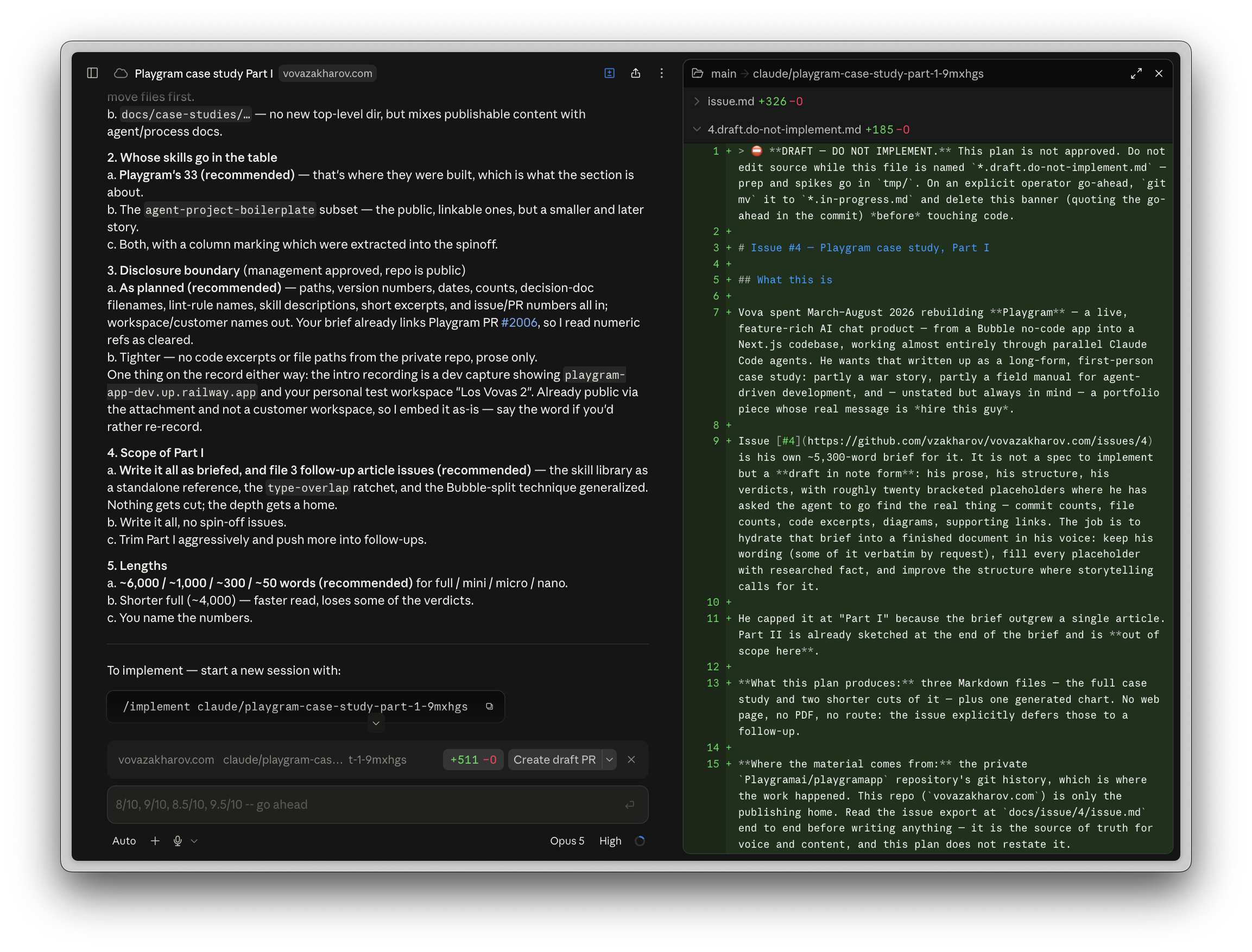
So in the end, my usual flow goes like this:


Session 1: start writing a plan using the /issue skill (if you laid it out on GitHub first, or if e.g. the log review agent created it itself), or just from /pr do this-and-that. Review the plan, discuss it, come up with the decisions for the forks.
Session 2: /implement <branch/name> — which the agent in session 1 gracefully provided. Go to the PR, review code, add comments.
Session 3: /from-branch <branch/name> address code review — the agent sees my comments, also sees the entire PR history, does the changes, replies to all of my comments right on GitHub (also very handy, because you get the archaeology of every decision taken; it also helps restore your memory when you’re coming to the PR from one of the ten others you’re working on simultaneously).
Session 4: /finalize <branch/name> — it removes the unnecessary artifacts (such as the plan file itself), sees how the trunk has advanced since, merges it in, runs the necessary quality gates (more on that below), fixes them, and hands it off to me to merge.
I always merge with a squash — I don’t want each PR’s detailed archaeology to reach main. I need one commit with a snappy title and a high-level description body, so any agent (or a human, for that matter) trying to figure out how this or that feature came to be, or how this or that file advanced over time, or what stuff we need to include in the release, can do so from the log alone.
Verdict: 9/10 — there’s still stuff to optimize but as it stands it’s a wallet (and mind) saver.
Data migration
Getting a live app’s data — users, workspaces, chats, files, memories — out of Bubble’s proprietary store and into the new schema, without losing a row, double-charging anyone, or clobbering a workspace that had already cut over, was a project of its own: a reversible ETL behind a flag, an alpha cohort, repeated dry runs, and a cutover-day sequence per workspace. It’s too big to squeeze in at the end of Part I, so it gets its own section in Part II.
The handover
As of this writing, seventeen days have passed since I shipped 4.4.3 on 10 August and stopped writing code for this project. Fifty-four more units of work have landed on main and two more releases have gone out. Of the fifty-two pull requests in that window, three were mine — one set of release notes, a CI permissions fix, and a change to some agent tooling — and I pushed the second release straight to main. The other forty-nine were the rest of the team’s.
That’s the number I care about most, because of who the rest of the team is. Three people worked in this repo besides me, and they are the Bubble developers who built Playgram in the first place. Two of them created their GitHub accounts during this project — one of them on its first day. None of them had major coding experience before March — some hand-written JavaScript dropped into that Toolbox plugin here and there, usually after talking it through with an LLM first.
Which is not the same as being junior at anything. They had built a product on a no-code platform that most of the industry would tell you can’t hold a product like that, and built it well enough that reproducing it in code took me five months. What they hadn’t done before was work in a repository — branches, reviews, a type checker, a migration that has to run forwards.
Of the features they shipped in those seventeen days, in plain terms: a carbon estimate for every chat turn, built from the energy inputs recorded per query all the way up to the figure on the analytics tab and in personal settings, with a published methodology page standing behind the number. Per-project spend, so a team can see which project is burning the budget rather than only the workspace total. Billing that counts everything a reply actually costs — the tools it called, the images it made — instead of just the reply, with a type-level guard that makes it impossible to add a new model call without declaring which budget absorbs its cost. A hardening change that stops pasted content from impersonating the app’s own instructions to the model. Automatic retries that re-send a failed model pick to a different model instead of showing the user an error. And the unglamorous upkeep: two models retired onto newer ones, analytics filters rebuilt, a deploy that refuses to ship against a misconfigured environment.
Every one of those forty-nine pull requests came through the same pipeline this article describes — plan file, implementation, a DRY pass, a docs pass, a finalize attestation. The weekly rate is lower after the handover than before it, as you can see in the chart’s last full weeks, but the work kept going, through the same machinery, with nobody calling me but for code reviews, which I still own.
To be continued
This ends Part I of the case study; coming up in Part II:
- Continuous integration and deployment
- Unit, integration and E2E tests, and why it may not be a good idea to run all on every PR & merge
- Using Claude Code’s own VM as the petri dish to avoid spending money on GitHub Actions
- Release cycles and hotfix break-ins
- Data migration
- Stuff that sounds simple but isn’t
- Navigation, and that 75-commit, 139-file PR we had to ship mid-production because our representation of “what chat exists” kept bloating and drifting as more and more consumers were added
- Attachment handling: spreadsheets with unexpected stuff in them, images that failed to convert, and spreadsheets, always the spreadsheets, that made us end up writing a home-grown XLS reader
- Memory chunking, and that time a malformed HTML hung our entire app for 4+ hours and made us start using workers (I know I know)
- And, finally, why the hell it seemed like everything was ALMOST ready in 2 months, and stayed ALMOST ready for 2 more, or Pareto never fails.
Stay tuned!